Wednesday, April 4, 2012

Error: Unable to obtain hardware information for the selected machine.

Here's an odd problem I've found in VMware vSphere 4.1 while trying to export a VM. When wizard for export was called, it runs a hardware inspection, and I couldn't get thru it because it was showing that error:
Error: Unable to obtain hardware information for the selected machine.

Like any respectable sysadmin, I googled the solution, but I could only find vConverter stand-alone issues regarding VMs registered as Windows 2008 R2 and software not being able to handle that, so a change to Vista 64 was needed. However, this was not the case.

Tuesday, October 4, 2011

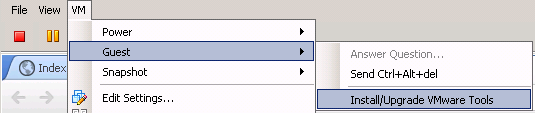
Installing VMware tools in Linux

So installing VMWare tools in Windows it's pretty easy with a wizard, but on Linux, if you're a first-timer, you'll have some issues. Here are the steps (they're pretty simple).

Select Install VMware tools in Console.

Thursday, September 29, 2011

Avoiding your proxy at work

I bet you wanted to do this since you got hired and saw that there are filters for certain webpages. So here's the thing, you can create a tunnel between your worstation and a host at home using SSH via SSL port.

Here's a classic scenario:


Basically here you have your workstation, and in order to get to the internet, you need to go through an ISA server working as a proxy server filtering your content. Here's where your facebook, youtube, IRC, and so on, gets filtered.


Wednesday, September 21, 2011

Installing a centralized syslog

Remember that I told you about this guide? So here it is. Basically, it explains step by step how to install Adiscon LogAnalyzer in an Ubuntu box. Let me know if something's not clear enough:


The Prep:

Before we dive into setting up any of this we need to do a little prep work. If you are going to be looking at these logs in a web browser then it might be good if the time stamps you are seeing reflect the appropriate timezone.