Tuesday, October 4, 2011

Installing VMware tools in Linux

So installing VMWare tools in Windows it's pretty easy with a wizard, but on Linux, if you're a first-timer, you'll have some issues. Here are the steps (they're pretty simple).

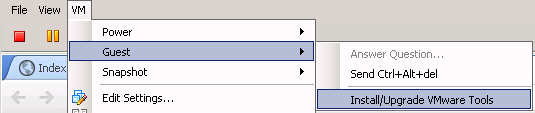
Select Install VMware tools in Console.

Thursday, September 29, 2011

Avoiding your proxy at work

I bet you wanted to do this since you got hired and saw that there are filters for certain webpages. So here's the thing, you can create a tunnel between your worstation and a host at home using SSH via SSL port.

Here's a classic scenario:


Basically here you have your workstation, and in order to get to the internet, you need to go through an ISA server working as a proxy server filtering your content. Here's where your facebook, youtube, IRC, and so on, gets filtered.


Wednesday, September 21, 2011

Installing a centralized syslog

Remember that I told you about this guide? So here it is. Basically, it explains step by step how to install Adiscon LogAnalyzer in an Ubuntu box. Let me know if something's not clear enough:


The Prep:

Before we dive into setting up any of this we need to do a little prep work. If you are going to be looking at these logs in a web browser then it might be good if the time stamps you are seeing reflect the appropriate timezone.

Monday, September 19, 2011

Terminal Services Gateway

We were looking for some solution where we can centralize every RDP session coming from outside (especially for vendor access), and we ended up with 2 choices: Citrix or Terminal Services Gateway (now known as Remote Desktop Services Gateway). Considering we already have licenses for Terminal Services, we are taking the latter. If you don't know what it is, here's a brief explanation.

Windows Server Terminal Services uses Remote Desktop Protocol (RDP) to enable the connections from clients to the terminal server, which uses port 3389. If you need to access a terminal server from outside the internal network (intranet), you have two options for doing so. You can either enable port 3389 through your firewall to specific servers (which isn’t a good idea), or, more commonly, clients connect to the corporate network via VPN, which can then enable the RDP session in a secure manner.